
Sabarimala Pilgrimage Booking
Sabarimala Pilgrimage
Booking
Booking Guidance
Virtual Queue Booking
Official Website: sabarimalaonline.org
Steps
- Register / Login with mobile
- Fill details + upload photo & ID
- Choose date and time & route
- Add pilgrims
- Optional: Aravana / Appam
- Optional: ₹5 for Pilgrim Relief Fund
- Confirm → Get QR Darshan Ticket
- Show the QR ticket at the Pampa checkpoint on the date of darshan


Room Booking
Official Website: onlinetdb.com
Book rooms online. Show receipt at Accommodation office.
You can also book available poojas at Sabarimala.
Steps
- Sign Up / Login
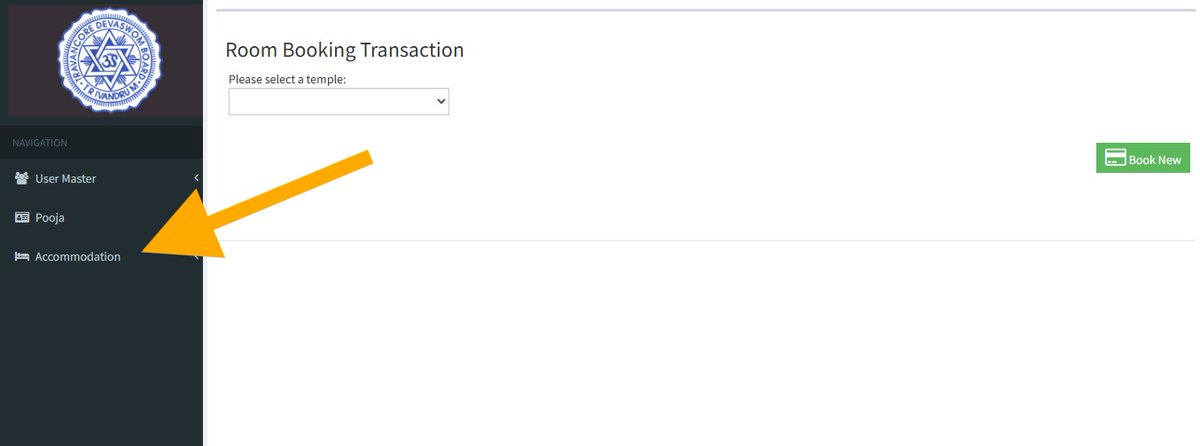
- Accommodation Section
- Select Sabarimala
- Choose date and proceed
- Fill details
- Pay & download receipt
- Show the booking receipt at the Accommodation Office at Sannidhanam




Pooja Booking & Annadhanam Services
Official Website: onlinetdb.com
Devotees can book various special poojas and offerings online via the official Travancore Devaswom Board (TDB) portal. Please present your Pooja booking receipt at the dedicated Sannidhanam Counter upon arrival.
Annadhanam Donation: Devotees can contribute to serving sacred meals at the Sabarimala Annadhana Mandapam. Online donations for specific dates are available under the Pooja section on the portal.
Steps to Book
- Sign Up / Login to the portal
- Navigate to the Pooja Section
- Select Sabarimala Temple
- Choose your desired date and Pooja
- Fill in the pilgrim details
- Complete payment and download your official receipt
- Present the printed/digital receipt at the Sannidhanam Counter

